Difference between revisions of "Modules:MainApplicationGUI-Documentation"
From Slicer Wiki
m |
|||
| Line 8: | Line 8: | ||
=Anatomy of Main Application GUI (page under development)= | =Anatomy of Main Application GUI (page under development)= | ||
| − | == File menu == | + | == Application menu == |
| − | + | The Application menu bar is at the very top of Slicer3's main window. It contains | |
| − | + | === File menu === | |
| − | + | '''File->Load Scene''' | |
| − | + | ||
| − | + | '''File->Import Scene''' | |
| − | + | ||
| − | + | '''File->Add Data''' | |
| + | |||
| + | '''File->Add Volume''' | ||
| + | |||
| + | '''File->Save''' | ||
| + | |||
| + | '''File->Close Scene''' | ||
| + | |||
| + | '''File->Exit''' | ||
| + | |||
== Application Toolbar == | == Application Toolbar == | ||
Revision as of 18:50, 20 March 2008
Home < Modules:MainApplicationGUI-Documentation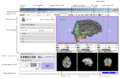
A. Schematic of the main application GUI
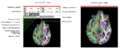
B. Schematic of a Slice Viewer and Slice Controller
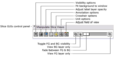
C. Schematic of the Controller for all Slice Viewers
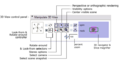
D. Schematic of the Controller for the 3D Viewer


Contents
Anatomy of Main Application GUI (page under development)
The Application menu bar is at the very top of Slicer3's main window. It contains
File->Load Scene
File->Import Scene
File->Add Data
File->Add Volume
File->Save
File->Close Scene
File->Exit

