Difference between revisions of "Documentation/4.0/Modules/FiducialRegistration"
| Line 21: | Line 21: | ||
{{documentation/{{documentation/version}}/module-section|Module Description}} | {{documentation/{{documentation/version}}/module-section|Module Description}} | ||
Here comes a description what the module is good for. Explain briefly how it works and point to the [[documentation/{{documentation/version}}/Modules/{{documentation/modulename}}#References|references]] giving more details on the algorithm. | Here comes a description what the module is good for. Explain briefly how it works and point to the [[documentation/{{documentation/version}}/Modules/{{documentation/modulename}}#References|references]] giving more details on the algorithm. | ||
| − | |||
| − | |||
| − | |||
| − | |||
| − | |||
| − | |||
| − | |||
| − | |||
| − | |||
| − | |||
| − | |||
| − | |||
| − | |||
| − | |||
| − | |||
<!-- ---------------------------- --> | <!-- ---------------------------- --> | ||
| Line 48: | Line 33: | ||
<!-- ---------------------------- --> | <!-- ---------------------------- --> | ||
| + | <!-- | ||
{{documentation/{{documentation/version}}/module-section|Tutorials}} | {{documentation/{{documentation/version}}/module-section|Tutorials}} | ||
Links to tutorials that use this module | Links to tutorials that use this module | ||
| + | --> | ||
<!-- ---------------------------- --> | <!-- ---------------------------- --> | ||
| + | <!-- | ||
{{documentation/{{documentation/version}}/module-section|Panels and their use}} | {{documentation/{{documentation/version}}/module-section|Panels and their use}} | ||
| Line 85: | Line 73: | ||
[[Image:screenshotBlankNotOptional.png|thumb|280px|Name of panel 2]] | [[Image:screenshotBlankNotOptional.png|thumb|280px|Name of panel 2]] | ||
|} | |} | ||
| + | --> | ||
<!-- ---------------------------- --> | <!-- ---------------------------- --> | ||
| Line 97: | Line 86: | ||
<!-- ---------------------------- --> | <!-- ---------------------------- --> | ||
{{documentation/{{documentation/version}}/module-section|Information for Developers}} | {{documentation/{{documentation/version}}/module-section|Information for Developers}} | ||
| − | {{documentation/{{documentation/version}}/module-developerinfo | + | {{documentation/{{documentation/version}}/module-developerinfo}} |
| − | |||
| − | |||
| − | |||
| − | |||
| − | |||
| − | |||
| − | |||
| − | |||
| − | |||
| − | |||
| − | |||
| − | |||
| − | |||
| − | |||
| − | |||
| − | |||
| − | |||
| − | |||
| − | |||
| − | |||
| − | |||
<!-- ---------------------------- --> | <!-- ---------------------------- --> | ||
| − | {{documentation/{{documentation/version}}/module-footer | + | {{documentation/{{documentation/version}}/module-footer}} |
<!-- ---------------------------- --> | <!-- ---------------------------- --> | ||
Revision as of 10:17, 2 February 2012
Home < Documentation < 4.0 < Modules < FiducialRegistration
Introduction and Acknowledgements
|
This work is part of the National Alliance for Medical Image Computing (NA-MIC), funded by the National Institutes of Health through the NIH Roadmap for Medical Research, Grant U54 EB005149. Information on NA-MIC can be obtained from the NA-MIC website. | |||||
|


Module Description
Here comes a description what the module is good for. Explain briefly how it works and point to the references giving more details on the algorithm.
Use Cases
Most frequently used for these scenarios:
- Use Case 1:
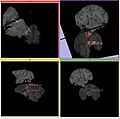
Images with fiducials attached by user]]
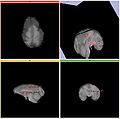
Images with transform applied to moving image based on fiducial alignment


Similar Modules
- Point to other modules that have similar functionality
References
Publications related to this module go here. Links to pdfs would be useful. For extensions: link to the source code repository and additional documentation
Information for Developers
 |
Section under construction. |

